Easter Celebration Party Flyer: Your Design Shortcut
Spring is in the air, and with it comes the vibrant energy of Easter gatherings. For designers, event planners, and small business owners, the race is on to create promotional materials that capture that festive spirit quickly and effectively. This is where a well-crafted template becomes invaluable. The Easter Celebration Party Flyer and invitation template offers a practical, polished solution for anyone needing to announce an event without starting from a blank canvas. It’s a tangible design asset built for real-world deadlines.
Visual Personality and Built-In Appeal
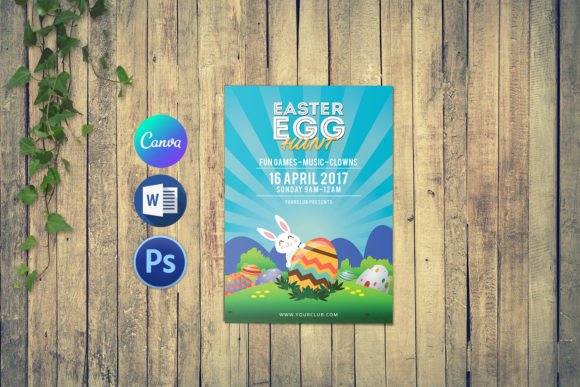
At its core, this template embodies a cheerful, approachable aesthetic. It’s designed to feel celebratory and welcoming, using a color palette and layout that immediately signal a festive occasion. The visual style balances modern typography with classic Easter motifs, ensuring it feels both fresh and familiar. The overall appeal lies in its versatility; it’s professional enough for a community center’s egg hunt yet charming enough for a family brunch invitation. The design does the heavy lifting, providing a cohesive visual hierarchy that guides the viewer’s eye from the headline to the essential details.
Practical Applications Across Projects
The true value of a template like the Easter Celebration Party Flyer is its adaptability across different mediums. Its clean structure makes it a strong candidate for both print and digital use. For print, the 4x6 inch and 5x7 inch sizes are standard for handouts, mailers, and bulletin boards. The 300 dpi resolution and CMYK color mode ensure professional print quality. Digitally, the template can be easily adapted for social media graphics, email headers, or website announcements. Entrepreneurs can use it to promote a seasonal sale, while bloggers might adapt it for a holiday-themed content piece. Crafters and hobbyists will find it perfect for personal invitations, saving hours of layout time.
Working with the Files: A Practical Guide
The included files—Photoshop (.psd) and Microsoft Word (.docx)—cover the most common design workflows. This isn’t a static image; it’s a working file. For those with a basic grasp of Photoshop CS2 or later, the layered .psd file allows for complete customization. You can swap out images, adjust colors, and refine layouts. The Microsoft Word version is a game-changer for users without design software. Changing the text is as simple as selecting it and typing your own details. The template also includes guidance on font usage, often with download links for the typefaces used, ensuring your final design retains its intended professional look. This flexibility makes it a practical choice for both seasoned designers and those handling their first flyer project.
Ensuring Your Design Communicates Effectively
A flyer’s job is to inform and invite. The layout of this template supports clear communication. The visual hierarchy is already established, with space for a strong headline, subheadings for event specifics, and clear areas for date, time, location, and RSVP information. The chosen typefaces, whether a serif font for elegance or a sans serif font for clarity, are selected for readability at a glance. This thoughtful pairing influences how your message is received, ensuring key details aren’t lost. The consistent use of style throughout the template also helps in building brand recognition for recurring events, creating a professional and reliable image.
Choosing and Customizing for Your Needs
Before diving in, consider your event’s tone. Is it a formal charity gala or a casual backyard party? This template leans towards a joyful, inclusive vibe. Evaluate the existing color scheme; while festive, you can easily modify it in Photoshop to align with your own brand identity or personal preference. Test the font pairings by previewing your text. Does the headline font have enough presence? Is the body copy legible? The included fonts are often premium fonts or commercial fonts, so reviewing the license in the help file is a crucial step, especially for commercial use. The ability to change fonts easily allows you to experiment with a script font for a more whimsical touch or a modern typography style for a contemporary edge.
Beyond the Flyer: Integrating into Your Workflow
Think of this download as more than a single-use file. The design elements—the layout structure, the typographic choices, the color harmony—can inspire related materials. A marketer could use the same visual language to create matching social media posts or a simple event page. A small business owner might extract the graphic elements for use in an email newsletter or a website banner. This approach ensures visual consistency across all touchpoints of your event promotion, strengthening your overall brand identity. The template acts as a starting point, a design asset that can be adapted and expanded upon, saving significant time and resources in your creative process. It’s a practical tool for anyone who values both efficiency and a polished final product.