Workflow Daily Planner: Your Organized Creative Companion
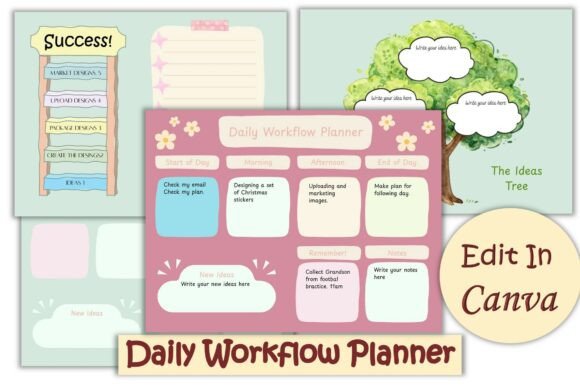
There’s a unique kind of pressure that comes with a blank page, especially when you’re juggling client projects, content calendars, and personal to-do lists. You need a system that feels less like a rigid corporate mandate and more like a supportive creative partner. That’s the exact space the Workflow Daily Planner was designed to occupy. It’s not just another set of sheets; it’s a carefully crafted visual tool that blends aesthetic appeal with genuine, day-to-day utility for the modern creative professional.
The Visual Character and Style
At first glance, the planner’s personality is clear: it’s approachable, modern, and intentionally clean. The design avoids visual clutter, employing a soft, neutral color palette that serves as a calm canvas for your own ideas. This isn't about imposing a style but facilitating your own. The layout uses a clear visual hierarchy, with ample white space to prevent your schedule from feeling cramped. It feels less like a corporate template and more like a page from a thoughtful designer's notebook—professional yet personal. The inclusion of the 'Ideas Tree' is a standout feature, acknowledging that inspiration doesn’t always strike in a linear, scheduled fashion. It provides a dedicated, visually distinct space to capture those fleeting thoughts without disrupting your focused task list.
Where This Planner Truly Shines
The true strength of the Workflow Daily Planner lies in its flexibility. It functions as a core piece of your design assets, adaptable across numerous professional and personal contexts. For a small business owner, it’s the daily command center for tracking orders, social media posts, and supplier calls. A freelance designer might use it to map out project milestones, client feedback rounds, and invoice reminders side-by-side. Content creators and bloggers can block time for writing, editing, and promotion, ensuring a balanced workflow.
Because it’s easily editable in Canva, you can make it a seamless extension of your brand identity. Imagine changing the accent colors to match your logo, swapping the font to one that mirrors your web design or social media graphics. This level of personalization transforms it from a generic planner into a branded piece of your operational toolkit. You can print it for a tactile planning session or keep it digital for quick access on the go. Its design is versatile enough for personal use—managing a household or a passion project—or for commercial project tracking where clarity is paramount.
Practical Guidance for Integration and Use
Adopting any new system requires a bit of thoughtful setup. Here’s how to get the most out of this planner:
- Evaluate Your Workflow: Before diving in, take a moment to consider your daily rhythm. Are you someone who plans in 15-minute increments or in broader morning/afternoon blocks? The planner’s layout supports both, but identifying your natural style will help you use it most effectively from day one.
- Customize for Clarity: Don’t just fill in the blanks. Use the editable features to your advantage. If you’re a visual thinker, change the color of the 'Ideas Tree' to make it pop. If you have recurring tasks, create a small icon or shorthand to save time. The goal is to make the planner work for your brain, not the other way around.
- Test Font Pairings for Your Brand: Since you can change the font, consider how it pairs with your existing materials. If your brand uses a clean sans serif font for headings, using that same or a complementary style in your planner will create subconscious cohesion. A consistent typeface across your notes, website, and social media strengthens brand recognition.
- Review and Iterate: Your needs will change. A planner that works for a product launch week might differ from a week focused on deep creative work. Don’t be afraid to re-edit the template in Canva. Save different versions for different project phases. This isn’t a static document; it’s a living part of your process.
The Workflow Daily Planner ultimately succeeds because it respects the user’s time and intelligence. It provides a structured yet flexible framework, presented with a clean, modern aesthetic that avoids distracting from the main event: your work. By integrating it into your routine, you’re not just organizing tasks—you’re creating a visual record of your professional progress, one thoughtful, planned day at a time.